Please download the plugin (now at version 1.0.2) from the wordpress.org plugin directory
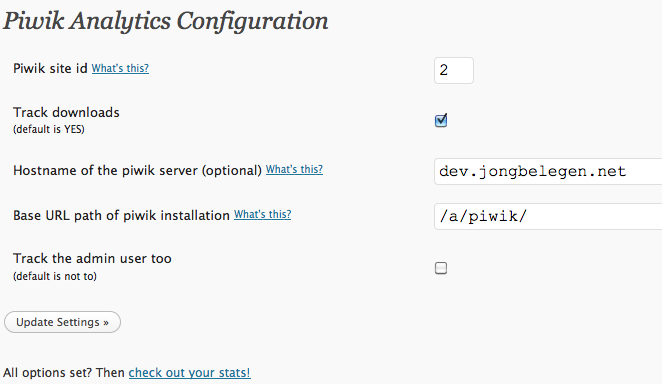
This is a basic wordpress plugin for the excellent Piwik web Analytics tool. It adds the piwik javascript code into every page of your weblog, so you don’t have to code PHP to add it to your templates.
Please note you will have to have access to a working Piwik installation for this to work.
It is based quite heavily on the Google Analytics wordpress plugin by Joost de Valk.
The following options are supported:
- hostname and path to Piwik options
- site ID
- option to control download tracking
- option to exclude the admin user (probably you)
Your feedback is important. Please test it for me, report bugs, and leave feedback in the comments so I can improve this software.
I will update this post whenever there is any news.

Installed plugin in wordpress 2.9.2, I’ve added only a little call to and it worked perfectly.
Can you use the Changelog tab ? (in the plugin presentation)
Yep, good idea.
Just wanted to say thanks for the plugin! It’s great, works fine.
Latest version of WP an Plugin version 1.1…no problems here.
Thanks for your work!
Version 1.0.2 is out. No functional changes.
* small helptext change
* added a changelog
will geo ip plugin work with this?
It’ll work with any Piwik plugin that use the standard Piwik.js tracking code.
I have installed this on a xampp server using local host. Piwik works fine as the plugin for zen photo works, however, I am not getting any stats for the wordpress blog. Any suggestions?
great plugin, thanks.
Adrian
I have a request-or rather a feature I’d love to see. Is there a way that a site id in Piwik could be tied to Author id. In this case, in a multi-blog situation, the author would see the stats only for his or her posts–assuming the posts were tagged. I would also like to share info in a page on the blog a logged in author could access when logged in.
Regarding your first question:
If you can map each WP author ID to a piwik site ID, you can use something like this in your theme’s functions.php.
See http://pastebin.com/0S3qMtbH
Idea:
- map the WP author ID to piwik site ID using an array
- Use the correct site id in the javascript
NB: don’t activate the piwik analytics plugin if you use this!
Installation is not easy, with no guide. I mean plugin configuration.
Next release, I’ll improve the docs, and perhaps includie a video tutorial.
Any chance of a version that works with WordPress 3.0.1?
Just found some time to check my test blog, and I see the tag on the page, and traffic coming in on my piwik installation.
WordPress version: 3.0.1
Piwik version: 0.9
I’m using WordPress v3.0.1 and it doesn’t work. I’ve configured it since it’s very simple but nothing happened
I had to place the script myself directly into the theme to make it work.
I hope you can update the plug-in ‘cos it seems to be very useful.
Regards,
Mauricio
Mh.. sorry it didn’t work for you. Thanks for leaving a comment, though!
Right now, I’m pretty busy doing paid work. After those projects are done, I will update my plugin.
Hey – thanks for the plugin; in my case it does not work, because the piwik is installed on an external server and I have to talk to the server with “https” and your plug in allows only “http”
That’s correct, it always uses the same protocol as the page itself.
Another one for my todo list.
Hi — the noscript part of the piwik snippet is missing, e.g.:
Hi,
Looks like a great plugin!
I have one questions before I “dare” start playing with it: Does it work along side cache plguins, like WP (Super) Cache and so on?
THANKS!
Yep, it should work without a problem.
Since all the script code is the same on every page, caching will make the script load faster, not differently.
My blog is at abc.com/blog, but my piwik account (which monitors multiple websites) is at def.com/piwik. How do I configure the “Base URL path of piwik installation” to get this to work?
The hostname is def.com.
The base URL path /piwik/
Here’s the screenshot:

Does this work on wp 3.0? I couldn’t get it working for that version.. here’s the post: http://wordpress.org/support/topic/plugin-piwik-analytics-cant-get-it-working-with-wordpress-301-302?replies=1
Any help would be greatly appreciated.
I replied to the support thread. Basically, I need more information, like the url of your site, your settings, the generated output (if any).
Thanks!
De plugin werkt goed, maar in de orginele code wordt er een img tag geplaatst voor bezoekers die JS uit hebben staan.
Kan ik die op de een of andere manier nog toevoegen?
Niet zonder de plugin code te wijzigen
Ik ben bezig met een betere versie van de plugin, ik zal dit meenemen.
Nieuwe release komt eind dit jaar, of in januari. Even wat tijd vinden.
Bedankt voor je reactie!
Is er misschien een mogelijkheid dat ik die img tag er zelf tijdelijk in zet?
Kan geen code schrijven maar het lijkt mij nou niet echt een groot probleem.
Wil je niet pushen hoor, maar mis de stats van sommige bots op dit moment
Heel er bedankt!
Thanks your article. nice.
Great plugin, however in these times of google ranking fast sites higher than slower sites, is there any chance of updating the plugin to support the more user responsive asynchronous tracking recently introduced into piwik?
Yes, good things are happening in the Piwik development.
Asynchronous tracking is definitely coming in a new version of my plugin.
Hi Jules,
i have installed the plugin for an private project on “localhost” and it works great.
I will try to put in online.
Best regards from Rogarema Netherlands
Many thanks for this WP-Plugin
I tried to change the admin password, and the “uploading data” is running or looping indefinitely. Basically, I can NOT change the admin password. Please advise. Thanks!
Hi,
I installed the plugin, but have a issue to get it working.
the version of wordpress is 3.21 nl
i noticed that the map piwik is nog created, do i have to do that manually?
The id, were can i find this?
thanks,
Thea
Awesome plugin, man! Simple and elegant. One note: if you try it out and it appears that it’s not tracking hits, you probably need to logout because by default Admins aren’t tracked. That is mentioned in the F.A.Q.s, but I thought I’d put it here too.
Hi,
I have a empty list of keywords, how can I check if the plugin works on that point?
Thanks Danny
Much like Adrian, I would really like to see a feature that tracks the logged in user. Maybe through Piwiks custom variables, so that you could either save the user group or user id in a custom variable.
I really like your Piwik plugin, but I miss the feature to disable tracking not only for admins, but for other roles like authors too.
Could you please add that feature?
wp Plugin installed and Piwik installed too but getting no data reading at all – any ideas?
When I visit your site, I see the tracking code, a correct piwik installation, and I see the tracking pixel sent.
Everythink looks OK. Are you looking at the correct date (today?).
Here’s the pixel I see leaving my browser:
GET /piwik/piwik.php?action_name=Chillax%20%7C%20Time%20to%20Chill&idsite=1&rec=1&r=806690&h=12&m=18&s=54&url=http%3A%2F%2Fwww.timetochill.me%2F&_id=da3f9e33597992b9&_idts=1324552734&_idvc=1&_idn=1&_refts=0&_viewts=1324552734&pdf=0&qt=1&realp=0&wma=0&dir=0&fla=1&java=1&gears=0&ag=1&res=1280×800&cookie=1
Hi, I just can’t figure out what to put in WP account settings in wordpress. it is Asking about. i have latest WP-Piwik version.
Piwik URL:
Auth Token:
and i don’t know where to find it, and i don’t know where to access,Piwik
Please help
Thank you !
Hi Jules – when i search for your plugin in Dashboard>Install Plugins for just the keyword “Piwik” it doesn’t show I have to type in “Piwik Analytics” – I would imagine you’ll get more of a user base if you can target it just for “Piwik”
Anyway it works for me just fine.
Thanks
I’m missing a guide through the WordPress-Piwik-Statistics. For example: what do the colors (red and blue graphs) in the statistics of the visitors over the last 30 days mean? There is no explanation anywhere!