Google Forms Shortcode WordPress Plugin

Current version of the plugin is 1.0.1, the first release + a small typo fix. Download it from the WordPress.org site.

This WordPress plugin adds the possibility to easily insert forms created by Google docs into pages and posts using a shortcode. The form will be embedded using an iframe.
It also contains options for default settings, so you don’t have to change all iframe codes if you e.g. change the width of your content column.

What do I need?
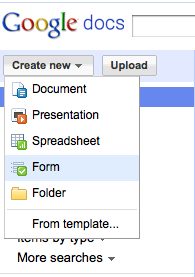
screenshot

Create new > Form

First, create a Google spreadsheet form. This can be done by choosing Create new and Form in Google Docs.

More information about Google Forms and how they work can be found on the Google Forms support page.
For those of you who like screenshots, check out Google Forms quick howto.

Then, design the form or survey and find the formkey. The formkey is a very long string of letters which is unique to every form. Copy this string. It can be found in the edit window while editing the form. It’s the unreadable part after ?formkey=:

The form key.

What do I have to do to insert this form in my WordPress page?

On the place in your post or page, insert a shortcode called googleform. This shortcode will be replaced by the Google form iframe.

A sample shortcode looks something like this:

[g oogleform key="dFJXOFlwQVRDSHBYX1ZFdmN6NjliclE6MA" height="700" width="600"]

key is mandatory. The height, width and text parameters are optional, and defaults can be set on the plugin option page.
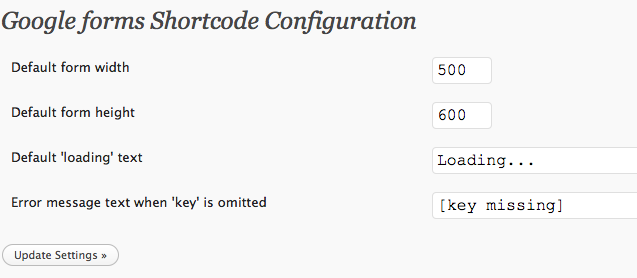
The options page

I want it! Where can I get it?

Right on! Add the plugin using the built-in WordPress plugin browser (search for google forms) or download it from the WordPress.org site
After that: activate the plugin, and start inserting forms!

Please leave a comment below when you encounter issues (or when everything works fine).

Do you have a sample?

Yes. Right here:

Like posts like these? Follow my (English) RSS feed.

Tags: , , , ,

Over

Jules Stuifbergen is webanalist met een voorliefde voor online marketing, usability, psychologie en techniek, en tevens eigenaar van deze site. Hij helpt je graag verder online. Nodig hem eens uit voor een kop koffie! Mocht je dit blog interessant vinden, abonneer dan op de RSS feed of nieuwsbrief.

9 reacties op “Google Forms Shortcode WordPress Plugin”

  1. jay 20 juli 2010 op 22:43 #

    Great plugin…
    how can i remove the scroll bars?
    Thanks in advance.

  2. Jules 21 juli 2010 op 12:16 #

    @jay:
    The form is embedded as an iframe. To get rid of the scrollbars, you have to set the height of the iframe to be greater than the height of the form itself.

    From within the shortcode, use the height=”700″ parameter, and set it to a high value.

  3. Enci 25 augustus 2010 op 07:48 #

    Love it! Thank you so much! :-)

  4. Melody 11 oktober 2010 op 23:26 #

    Hi,
    I downloaded the plugin and have tried every different way to embed the google form into my document, but it just keeps putting this on my site:
    [google ?formkey=dE9wNUVJZjhWNzdYN18zU21pT2ZRV3c6MQ]

    How can I embed the form so it shows on the page, not the link?
    Thanks

    • Jules 12 oktober 2010 op 08:08 #

      Try:

      [googleform key="dE9wNUVJZjhWNzdYN18zU21pT2ZRV3c6MQ"]

      Without the question mark, and in between quotes, let me know if it works.

  5. Alex 7 november 2010 op 00:59 #

    hei there,

    first of all thanks for the plugin! can you please tell me if it’s possible to add a transparency to a form using it?

    thanks in advance!

    • Jules 7 november 2010 op 21:08 #

      If you get it to work, please tell me, I’d like to know as well.

      The iframe code allows for transparency, I do not know if it’s possible to style the iframe body with ‘background: transparent;”

  6. Ruth 19 november 2010 op 21:27 #

    Hello,

    I’ve entered this into the html:

    [googleform key="dF9vM0FtMllzektyRU16Sm1LRFFqVEE6MQ" height="700" width="500"]

    But the page simply displays white space. Have I written it wrong, or is something conflicting with this plug-in?

    Thanks!
    Ruth

Reageer